How to track dental lab cases without losing them in WhatsApp
If you run a dental lab handling more than a handful of cases at once, you already know the moment: a clinic messages 'is it ready?' and you have to scroll back through weeks of chat, or walk over to the bench, just to answer. Learning to track dental lab cases without losing them in WhatsApp isn't about scrolling faster or building better folders inside a chat app — it's about admitting WhatsApp was never built to hold a case in the first place.
Last updated July 14, 2026
Why was WhatsApp never a real tracking system?
A restoration order isn't one message — it's a prescription, a set of photos, a due date, a status, and eventually an invoice. WhatsApp only has one structure to offer all of that: a single scrolling thread. There's no field for a status, no way to flag a due date, and no way to ask 'show me everything due today' across every clinic chat at once.
- The scroll is the only filing system — a case from three weeks ago means scrolling back, or asking the group who remembers it.
- Nothing in a message is a status — 'is it ready?' only gets answered from memory, or by a phone call to whoever is standing at the bench.
- Search only finds words, not a case — you can search for a shade code, but not for everything due today across every clinic.
- Every phone shows a different slice of the same mess — the owner's phone, the front desk, and the technician's phone rarely agree on what's actually pending.
So how do you actually track dental lab cases without losing them in WhatsApp?
Real tracking means the information a case carries lives on the case itself, not inside a conversation about it. Four things have to be true:
- One structured case per restoration — the prescription, photos, due date, and status all sit in one record, not scattered across messages from three different days.
- A shared live status both sides see — submitted → in production → ready → shipped → closed — so 'is it ready?' has an answer on the screen instead of a phone call.
- Search by case number, patient, clinic, or restoration instead of scrolling back through months of messages to find one case.
- A timeline that records who did what and when — an append-only history nobody can edit — so a 'nobody told us' argument has an actual record to check.
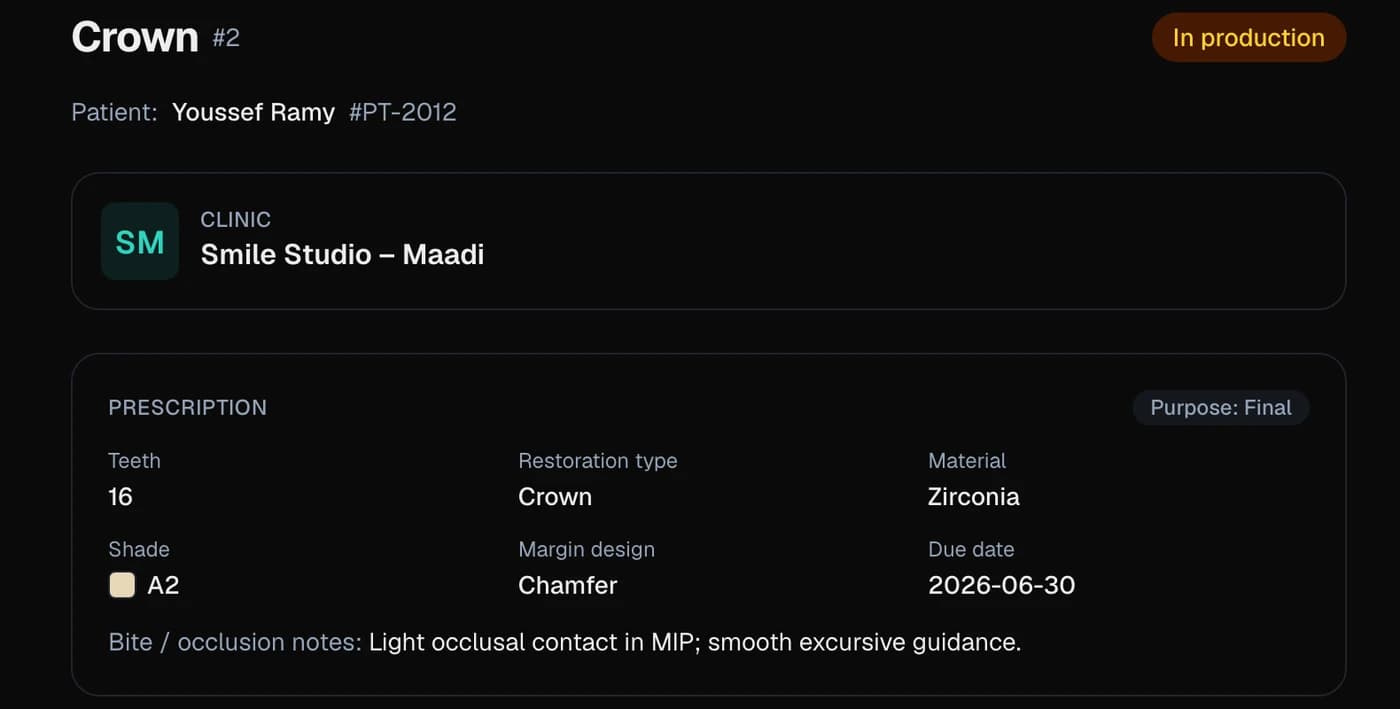
None of that requires giving up the habits that make WhatsApp fast — it just means the case record stops living inside a chat.
How do you see your whole day at a glance?
This is where a Production board replaces the morning scroll. Instead of opening a dozen chats to reconstruct today's workload, every case sits as a card in one of four columns — New, In production, Ready to ship, Done — and moves itself the moment work happens.
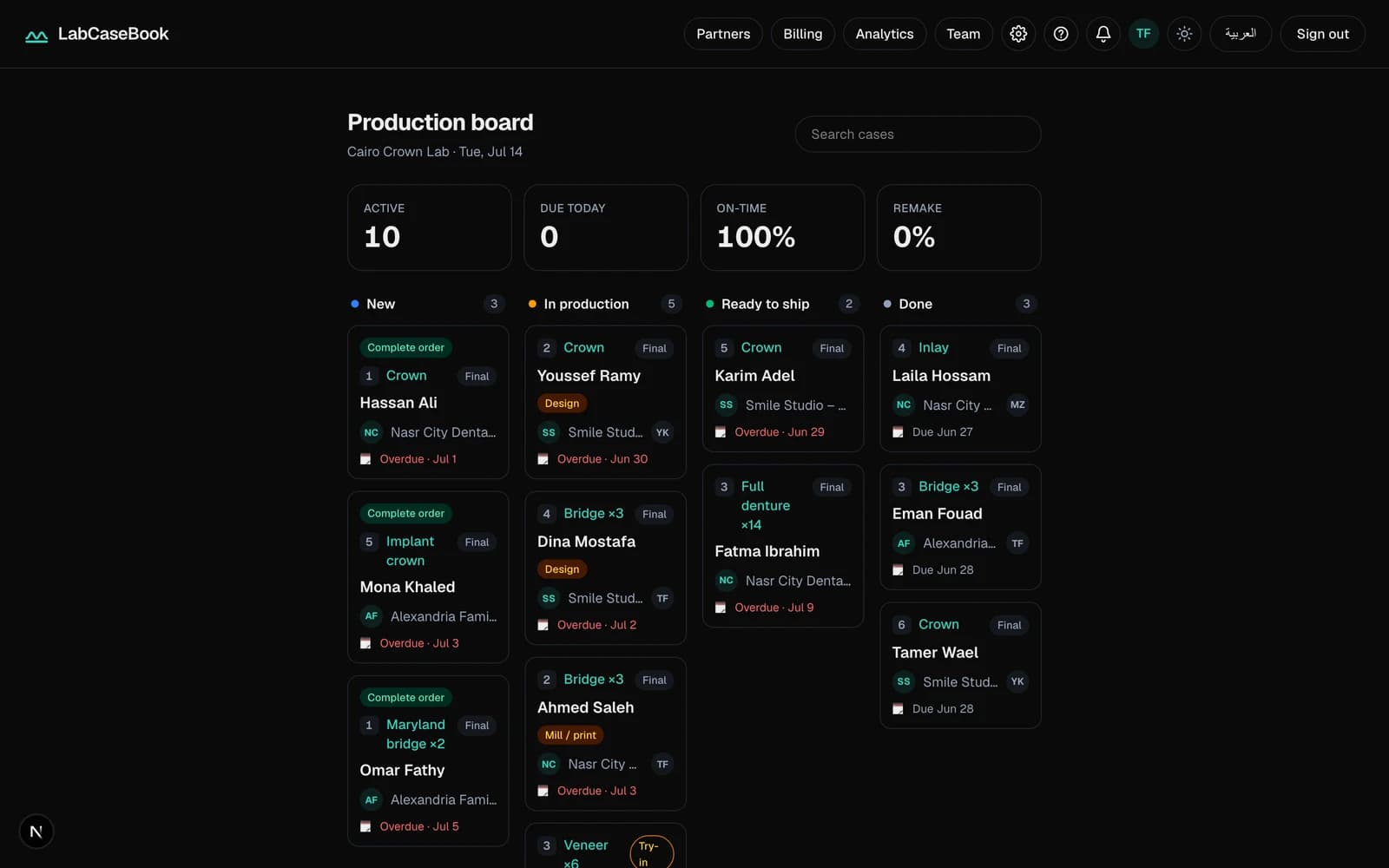
| What you see | Why it matters |
|---|---|
| Stat tiles: Active, Due today, On-time, Remake | The lab's whole day, before you open a single case. |
| Due today in amber, Overdue in red | No case quietly slips past its deadline unnoticed. |
| Search cases by case number, patient, clinic, restoration, or shade | Find one case in seconds instead of scrolling old chats. |
The board updates itself the moment a status changes, on every screen in the lab at once — the technician's phone, the front-desk computer, and the owner's tablet all show the same day.
Does this mean dropping WhatsApp entirely?
No — and that isn't really the point. LabCaseBook doesn't ask a lab to give up the phone habits that already work; it asks a lab to stop treating WhatsApp as the record of a case. Casual conversation can stay wherever it already lives.
- Anything that belongs to a case — the prescription, a shade photo, a status change, a remake reason — belongs on the case, not in a chat that scrolls away.
- Each case keeps its own Messages thread for exactly the back-and-forth WhatsApp is good at, attached to that case forever instead of buried in a group with forty other conversations.
- Shade photos, impression photos, scan files, and X-rays all attach to the case itself at full resolution — not recompressed the way a chat app compresses everything it sends.
The practical rule: if it's about a specific case, it goes on the case. If it's just a quick good-morning or a general question, WhatsApp is still fine for that.
Common questions
- Do I have to give up WhatsApp completely to start tracking cases properly?
- No. Keep WhatsApp for casual chat — the rule that actually matters is that anything about a specific case (prescription, photo, status, remake) moves onto the case record instead of staying in the scroll.
- Isn't organizing my WhatsApp chats better — one group per clinic — basically the same thing?
- It helps, but it doesn't fix the real problem: a WhatsApp group still has no status field, no due-date flag, and no way to search across clinics for everything due today. Better folders inside a chat app are still just a chat app.
- Can I actually find a case from three months ago without scrolling?
- Yes — search by case number, patient name, clinic, restoration, or shade, and the case comes up directly with its full history attached, instead of scrolling through old messages.
- How do I answer 'is it ready?' without walking to the bench every time?
- The case status updates live and both sides see it — submitted, in production, ready, shipped, closed — so the answer is already on the screen before the clinic even asks.
- Do I need to buy tablets or install anything special for the production board?
- No new hardware — it installs like an app on whatever phone, tablet, or computer the lab already uses, straight from the browser.
Related pages
New to LabCaseBook? Start from the homepage or browse the Help Center.