Clinic–lab communication for dental cases, without the chaos
Clinic–lab communication usually means one endless WhatsApp thread: shade photos compressed beyond recognition, prescriptions dictated as voice notes, and “which case is this about?” asked ten times a day. LabCaseBook gives every restoration its own structured case — chat, photos, Rx, and live status together, shared by clinic and lab, so nothing gets lost in the scroll.
- A private Messages thread on every case — attached to it forever
- Photos stored byte-for-byte with a Full resolution badge — zero compression
- A notification the moment the other side acts — no more “is it ready?” calls
- One shared case history both sides see — the referee when there's a dispute
Last updated July 3, 2026
Every message attached to its case
Each case carries its own Messages thread — like the chat you already know, but pinned to the case forever. Type, tap Send, and the other side's whole team gets a “New message” notification; replies appear instantly.
- Nobody asks “which case are we talking about?” — the message sits right next to the case number, the prescription, and the photos.
- A new assistant opens the case and reads everything ever said — no forwarded screenshots.
- Six months later the discussion is still there, beside the photos — not on somebody's lost phone.
Shade photos that keep their colour
On WhatsApp a shade photo is compressed on send — the lab matches a colour the dentist never shot, and someone pays for the remake. LabCaseBook stores every file byte-for-byte exactly as uploaded, with an integrity checksum and a Full resolution badge on each photo: what the clinic shot is what the lab sees.
| Type | Use it for |
|---|---|
| Shade photo | Photos with the shade tab next to the tooth — the lab's colour reference. |
| Impression photo | The impression or the preparation. |
| Scan file | Digital scans — STL/PLY files from any scanner. |
| X-ray / CBCT | Radiographs and CBCT exports. |
A written prescription instead of a voice note
“Make it zirconia… the shade looks like A2… I'll send the rest later” — dictated instructions get misheard, and half never arrive. The New case form captures the full Rx instead: teeth on an FDI chart, restoration type, material, shade, margin design, occlusion notes, and the due date — and LabCaseBook refuses to send an incomplete case at all.
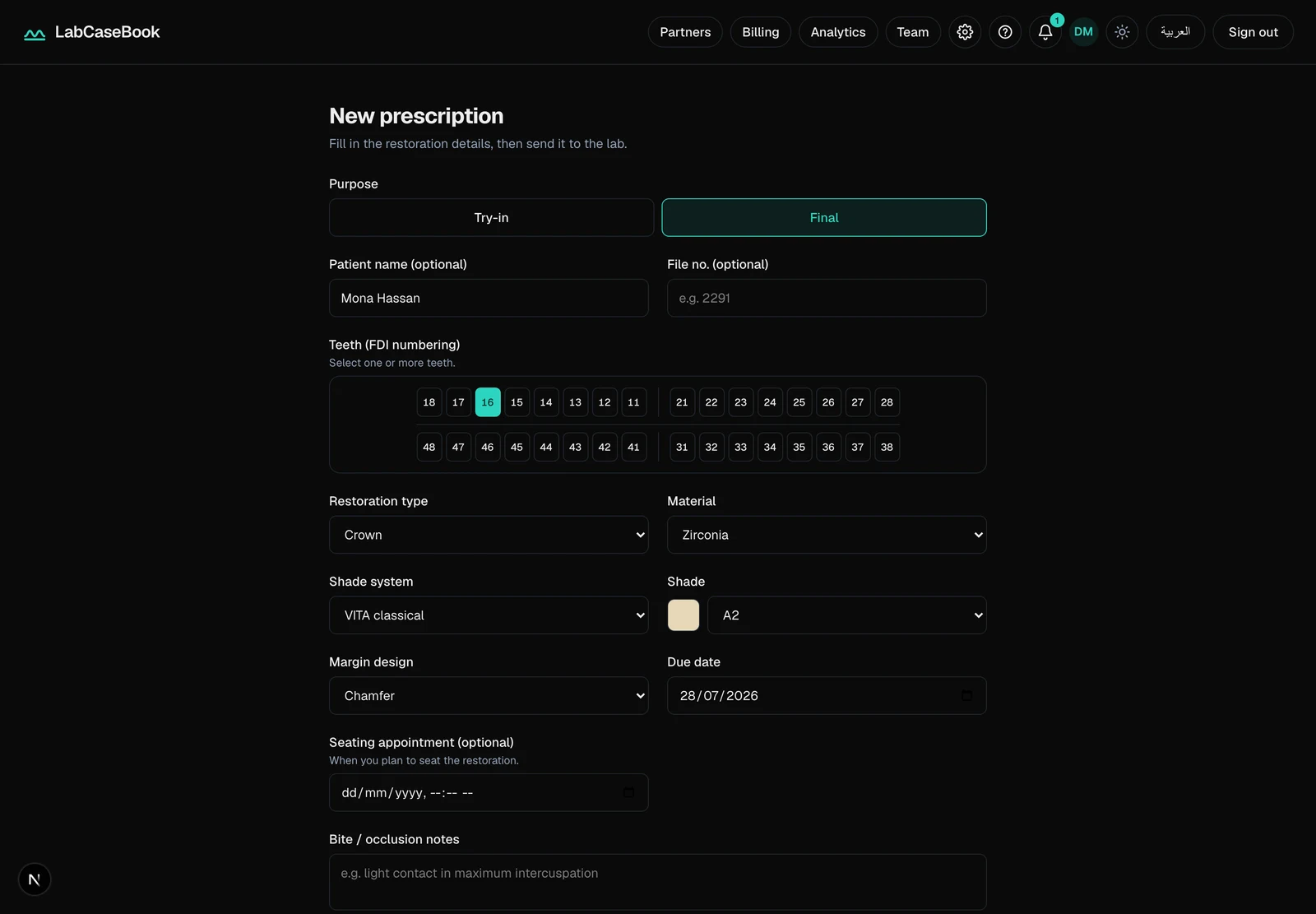
After Send to lab the prescription locks, so the lab always works from one reliable version — clarifications go in Messages, on the record next to the Rx.
How clinic–lab communication works on LabCaseBook
- 1Connect once: the clinic opens Partners and taps Connect on its lab; the lab taps Accept.From that moment both sides look at the same case — one version, not two conflicting chats.
- 2The clinic taps New case, fills the prescription, adds photos, and taps Send to lab.
- 3Case talk happens in Messages from either side; the clinic attaches files with Add photos / Add files, and the lab views and downloads them at full quality.
- 4Tap Enable alerts on your devices — a notification arrives the moment the other side acts: a new case, a message, a status change.
- 5Watch the case move through its live pipeline — Draft → Submitted → In production → Ready → Closed — on both screens at once.No “is it ready yet?” calls; the screen answers before anyone asks.
Common questions
- Do we have to quit WhatsApp on day one?
- No — keep WhatsApp for anything you like. What changes is where case work lives: a case's prescription, photos, and questions belong on the case, findable months later. Start with one real case — the difference sells itself.
- My lab isn't on LabCaseBook yet — what do I do?
- Cases flow between connected partners only, so ask your lab to sign up and create a Lab organization — two minutes, free to start during the pilot. Then open Partners, tap Connect, and once the lab accepts, send your first case.
- Are photos compressed like they are on WhatsApp?
- Never. Files are stored byte-for-byte as uploaded, with a checksum to prove integrity and a Full resolution badge on every photo. Shade-photo colour accuracy is the core reason LabCaseBook exists.
- What stops the lab missing my message the way WhatsApps get missed?
- A message on a case notifies the other organization's whole team — in the in-app bell, and on every device where someone tapped Enable alerts. And the message stays attached to the case — waiting there on a busy day instead of drowning in a chat.
- How much does it cost, and how do I pay?
- LabCaseBook is free to start during the pilot, no credit card needed — payments, when they apply, are by InstaPay or bank transfer. There are no public price plans yet.
Related pages
New to LabCaseBook? Start from the homepage or browse the Help Center.