LabCaseBook vs WhatsApp: a WhatsApp alternative for dental labs
Somewhere in your lab’s WhatsApp scroll: a compressed shade photo, an unanswered “is it ready?”, and a remake nobody can prove. A WhatsApp alternative for dental labs only makes sense if it keeps what WhatsApp got right — instant, familiar, on every phone — and fixes what breaks for dental cases. Here is that honest comparison — and the page to show your clinics.
- Shade photos stored byte-for-byte — a Full resolution badge on every upload
- A live case status both sides see — no more “is it ready?” calls
- Every remake recorded with its cause and photos — the referee for who pays
- Auto-invoices from your price list instead of a separate notebook
Last updated July 3, 2026
Where WhatsApp breaks for dental cases
WhatsApp didn’t fail your lab — it was never built for it. A restoration order is a prescription, photos, a deadline, a status, and money; WhatsApp treats all five as messages that scroll away.
- The scroll is the filing system — March’s case is somewhere up there.
- Photos arrive compressed — the lab matches colours the camera never saw.
- “Is it ready?” has no answer — so it becomes phone calls, every case, every day.
- Remakes are settled by memory — nobody can prove what the photos showed.
- Money lives in a notebook — prices and balances only one person understands.
WhatsApp vs LabCaseBook, side by side
First, the part comparison pages skip: WhatsApp is genuinely good at some of this.
| Aspect | LabCaseBook | |
|---|---|---|
| Speed and reach | Instant, familiar, already on every phone | Installs from the browser like an app — phone, tablet, or computer |
| Cost | Free | Free to start during the pilot — no credit card |
| Voice notes | Great for a quick voice note | No voice notes — case chat is text, attached to the case forever |
| Shade photos | Recompressed — colour accuracy lost | Stored byte-for-byte with a checksum and a Full resolution badge |
| “Is it ready?” | No status — a person has to answer | A live status pipeline (submitted → in production → ready → shipped → closed) both sides see |
| A case from three months ago | Endless scroll | One structured case per restoration — search by case number, patient, clinic, restoration, or shade |
| Remake disputes | Settled from memory | Every remake recorded with cause, note, photos, and attempt number — a history nobody can edit |
| Invoices | A separate notebook | Price list + auto-invoicing, with outstanding totals both sides see |
| An employee leaves | The chat history leaves with them | Cases belong to the organization — remove the member from Team, the record stays |
What a WhatsApp alternative for dental labs has to keep
Half the answer is keeping WhatsApp’s virtues — LabCaseBook is built for the same phones and habits:
- As easy as chat — every case has its own Messages thread, attached to the case forever.
- Already in your pocket — installs to the home screen on Android, iPhone, and desktop; tap Enable alerts for push.
- Arabic first — fully bilingual with complete RTL; everyone picks their own language.
- Free to start — the pilot is free, no credit card; payment, when it starts, is by
Instapayor bank transfer.
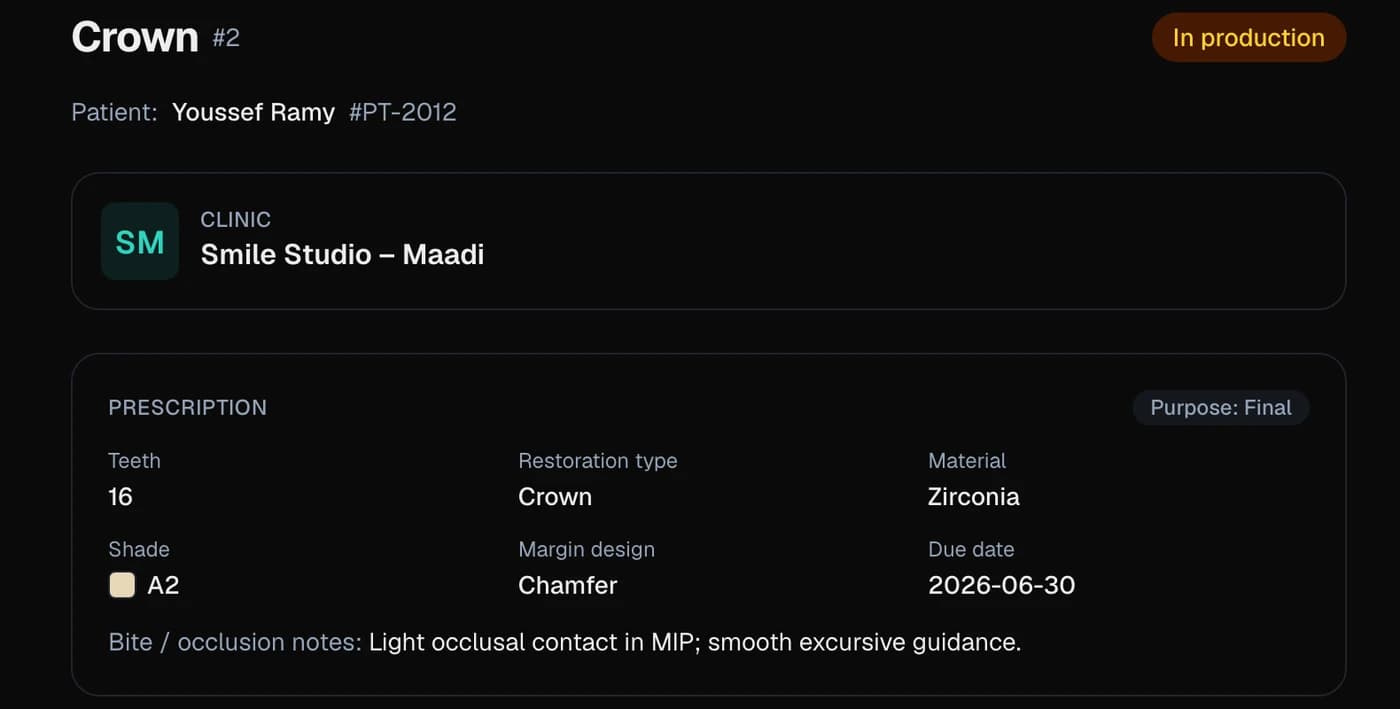
The other half is what chat can never give: a structured FDI tooth-picker prescription, a Production board with due dates and stat tiles, remakes with recorded causes, invoices from your price list, and a patient tracking link that quiets the front desk.
What switching actually looks like
- 1Sign up and choose Lab.New organizations get a quick review; once approved, clinics can find you in the lab directory.
- 2Set your Price list in Billing so invoices generate with one tap.
- 3Invite your clinics: each signs up, finds you under Partners, and taps Connect; you tap Accept.You onboard your own clinics — about two minutes each.
- 4The first case lands on your Production board complete — prescription, full-resolution photos, due date. Tap Start production.
The page to show your clinics
Switching only works if your clinics come with you — what they gain is easy to show.
- A live status instead of calling — the case page updates itself at every step.
- Shade photos reach the lab exactly as shot — the Full resolution badge shows on their screen too.
- A patient tracking link — name, restoration type, and a 4-step progress bar only, revocable with Turn off link — so fewer “is it ready?” calls.
- Every invoice sits on its case, totalled in one Billing screen.
Common questions
- Do we have to stop using WhatsApp completely?
- No. Keep WhatsApp for casual chat — LabCaseBook holds the case record: anything about a case (prescription, photo, status, remake, money) goes on the case; the rest stays in WhatsApp.
- My clinics will never learn a new app — how hard is it really?
- Nothing to download from a store — it opens in the browser and installs to the home screen like an app. A dentist’s first case is a form plus photos, and each case has a Messages thread that works like the chat they know.
- How much does it cost, and how would we pay?
- Free to start during the pilot, no credit card; payment is by
Instapayor bank transfer. Post-pilot pricing is not published yet. - Are the photos really not compressed like on WhatsApp?
- Really. Files are stored byte-for-byte, with a checksum and a Full resolution badge — up to 50 MB per file, including
STL/PLYscans and X-rays. - What happens to our years of WhatsApp history?
- Nothing moves — old chats stay in WhatsApp. LabCaseBook starts with your next case; from then on every prescription, photo, status change, and remake is on a permanent, searchable record.
Related pages
New to LabCaseBook? Start from the homepage or browse the Help Center.